
How Notion Uses AI Agents & Parta MCP to keep its Academy current and localized
“We’re coming in and out whenever we need a little bit more human judgment, but other than that, the agents are taking care of everything else in the background.”

Overview
About Notion Academy
Notion Academy is Notion’s self-paced learning platform, with guided courses, learning paths, and certifications. Its courses are built and maintained in Parta.
Notion’s customer education surfaces get about 1.4 million visits a month. The team tracks more than 30 product changes each month that could affect the Academy, and partner learning content ships in six languages beyond English.
The Challenge
Keeping learning content as current as the Help Center when the product ships every week. At the same time, partner courses were localized in a separate translation platform that couldn’t see the course, so every export and import was another place for things to break.
The Solution
Notion connected its Custom Agents to Parta through Parta MCP. One agent finds the lessons a launch affects; another drafts the approved updates and stages them in Parta, inside the lesson’s existing blocks and templates. Courses are now translated directly in Parta, with a blind review by a second AI model and a human editor deciding what changes.
The Outcome
1–2 hours saved per week on content upkeep and 15–20 minutes for the agents to process a product launch. Early localization data shows about 44% lower cost and 2–3 weeks saved per localized course. People still approve the scope of every change and the final copy.
Notion’s Customer Education, Localization, and Partner Enablement leads walked through both workflows in a joint webinar with Parta. This case study is based on that session.
Part 1: Keeping Academy Content in Sync with Weekly Launches
The challenge: content drift
Content drift is the gap between a product that changes every week and the learning content that explains it. For Notion Academy, it was the main risk to content quality.
Arya Sajjala, User Education Manager, runs Notion Academy with her team. They hold a high bar: content has to be accurate, true to Notion’s design and brand, and rich in multimedia, “because that is how we generally teach at Notion.”
The Academy teaches end-to-end workflows rather than single features. One lesson often touches several parts of the product, so a single launch can affect several lessons in different ways. Several launches can land in the same week, and more update requests arrive through Slack.
Before the agents, the team reviewed every signal by hand and traced each launch across the Academy. As Arya put it, the team “ran the risk of our content getting very stale very fast.”
The solution: two agents, two databases, one MCP connection
Notion joined the Parta MCP Design Partner Program. Most partners used it to create new content; Notion used it to keep existing content current. The team connected Parta MCP to Notion Custom Agents, so the agents can read and update the learning content stored in Parta.
A Custom Agent is an AI teammate set up once for one recurring job. The team writes its instructions, chooses what it can access, and decides when it runs.
The agents work from two Notion databases: the Academy library, which maps every course and lesson, and the Maintenance tasks database, which tracks the work each launch creates as it moves through review.
Two agents do the work:
- Academy Drift Agent reads a launch document, finds the Parta lessons most likely to be affected, and writes a recommendation report.
- Academy Drafting Agent turns accepted recommendations into lesson drafts. After human approval, it stages the updates directly in Parta. It starts when a task’s status changes in the Maintenance tasks database.
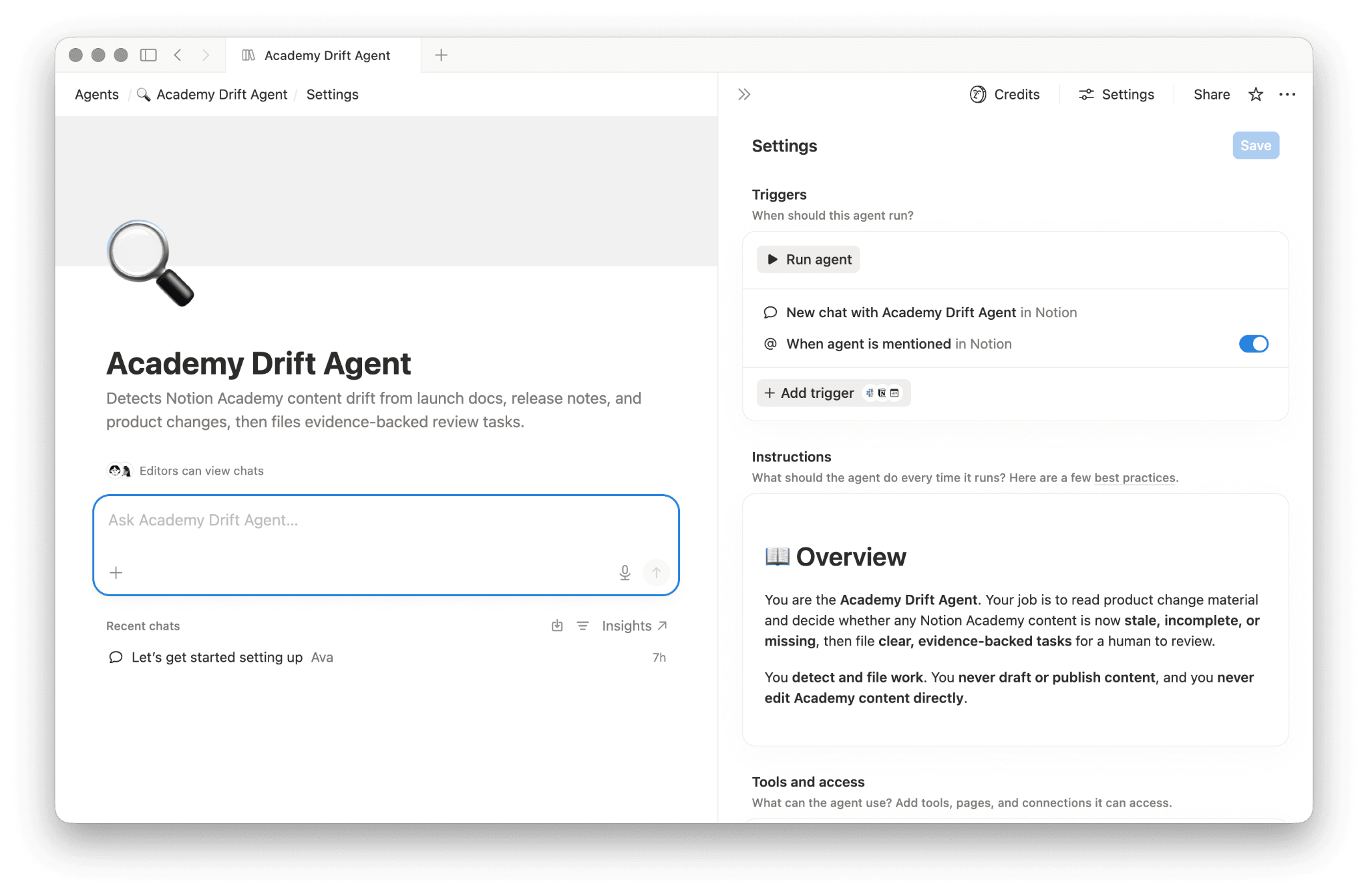
Academy Drift Agent’s report flags the lessons a launch is likely to affect.
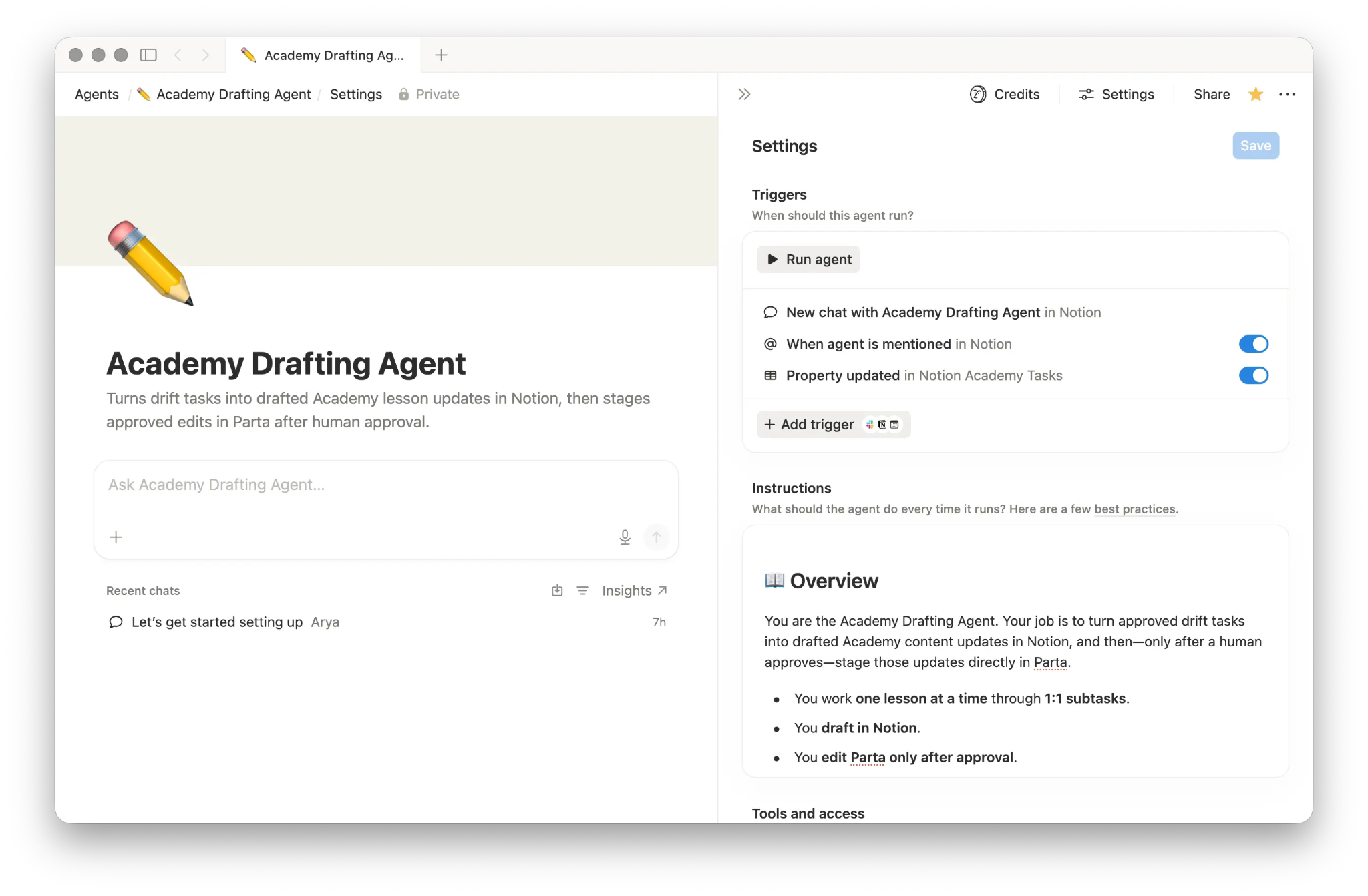
Academy Drafting Agent stages approved updates in the lesson’s existing Parta blocks.
How a launch moves through the workflow
The workflow alternates between agent work and human decisions:
- Detect drift. Academy Drift Agent reads the launch document, finds the affected lessons, and recommends specific updates.
- Approve or reject. A reviewer decides which recommendations to accept. The decisions are recorded and passed back to the agent.
- Draft. Academy Drafting Agent drafts the changes using Notion’s style guides, content frameworks, lesson-sizing guidance, and tone of voice. It creates one subtask per lesson.
- Edit and approve. A person checks accuracy and adds what the agent can’t yet supply reliably: new screenshots, videos, and GIFs.
- Stage in Parta. Academy Drafting Agent applies the approved changes to the right lesson blocks and moves the task to QA.
- Publish. A person does the final review in Parta and publishes the updated course.
Human review sits at the two points where mistakes are hardest to undo: approving the scope, and approving the final copy before it goes into Parta.
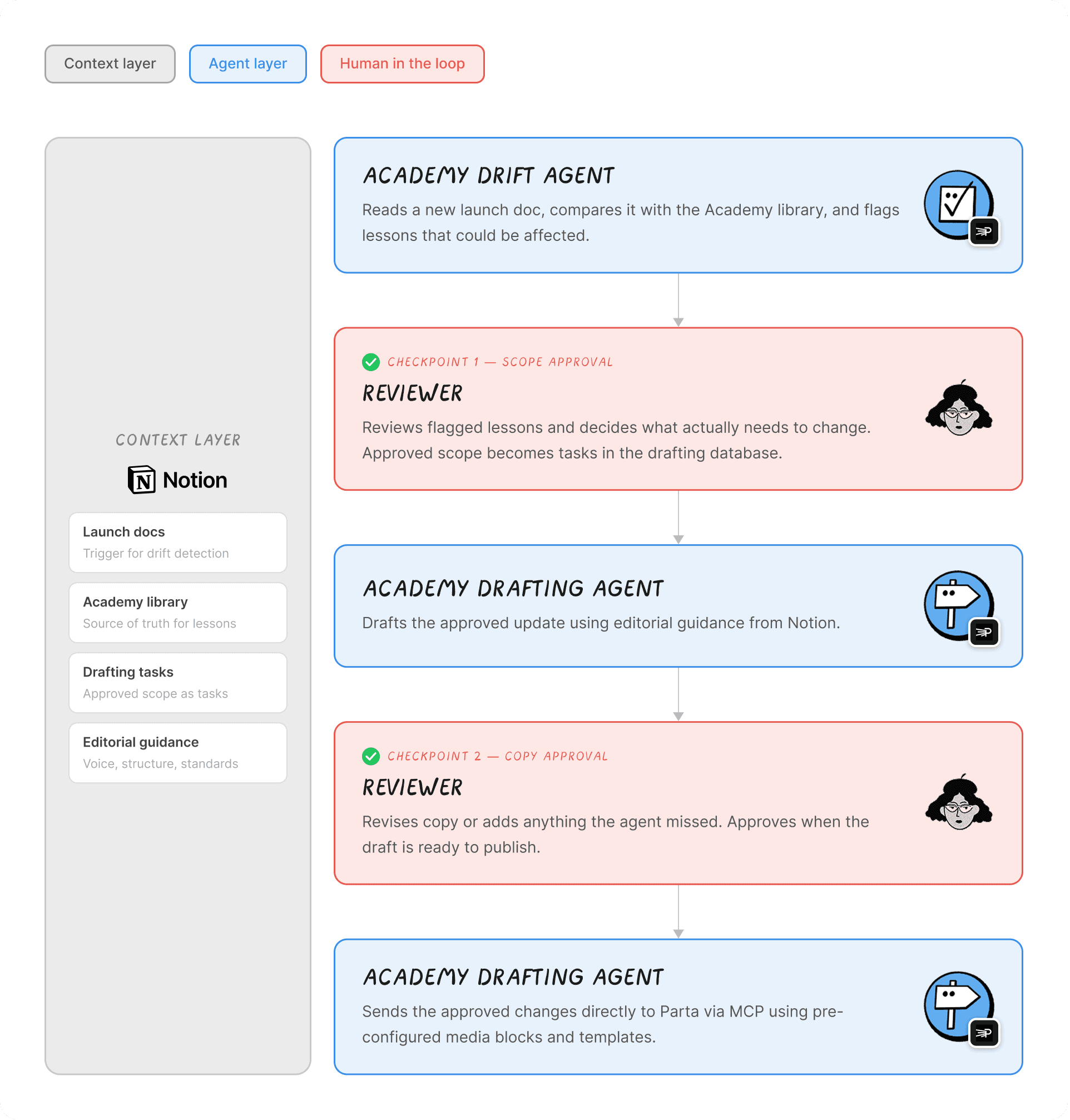
Notion’s maintenance workflow alternates agent steps with human review.
Updates that keep the lesson’s design
The key detail is how the Drafting Agent stages an update. It recognizes the custom templates Parta built for Notion Academy and works with the individual blocks inside them.
“It’s not just making text updates,” Arya explains. “It’s actually making dynamic, multimedia-focused updates.”
In the webinar demo, the agent drafted new elements for the “Triggers and Schedule” section of one lesson. It pulled a screenshot from the launch document and staged the update in the lesson’s existing format. It also made a smaller change to a second lesson. A real run takes 15–20 minutes, depending on the size of the launch.
The agent reuses screenshots from launch documents when they exist; the team adds fresh ones when they don’t. For bigger product changes, the agent can flag that a lesson needs more than an update. The team then decides whether to revise, remove, or rebuild it.
The system works because Notion keeps a central database of upcoming launches, which Arya calls “our heartbeat of how we ship at Notion.” The agents read that source directly, so the team relies less on individual product managers to explain what is changing.
The results
1–2 hours back every week
“We’re saving about one to two hours per week… Freeing up one to two hours per week has really changed the amount of work that I’ve taken on, and how much more strategic I am,” says Arya.
Design and interactivity preserved
Because Parta MCP works with Notion Academy’s own blocks and templates, routine updates keep each lesson’s visual and interactive design.
More current content, more learner trust
Lessons stay closer to each launch, so learners get reliable information.
Agents that improve with use
Each review decision gives the agents more context, so their recommendations get more accurate over time.
Scale without content debt
The agents handle small updates and escalate big ones, so routine maintenance no longer piles up.
How the learning designer’s role is changing
For Arya, the workflow shows where learning design is heading. AI moves the learning designer’s job away from repetitive upkeep and toward judgment, strategy, and directing agents:
- Less time on upkeep. Reformatting, re-recording, and chasing updates take less effort.
- More time on strategy. Designers spend more time deciding whether content is accurate, useful, and worth the learner’s time.
- A new skill: orchestrating agents. Giving agents the right context, and knowing when to trust their output, becomes part of the craft.
Part 2: Localizing Courses Where They Live
The challenge: two systems that couldn’t see each other
Notion’s partner ecosystem includes resellers and integrators in more than 35 countries. Partner learning content ships in six languages beyond English: French, German, Spanish, Portuguese, Japanese, and Korean.
A missed localization deadline delays partner enablement and gives partners in different markets an inconsistent experience.
The old process moved content between two disconnected systems. Courses lived in Parta, but translation happened in a separate platform. Someone had to trigger the connector, send the content out, wait, bring it back, and only then start linguistic QA.
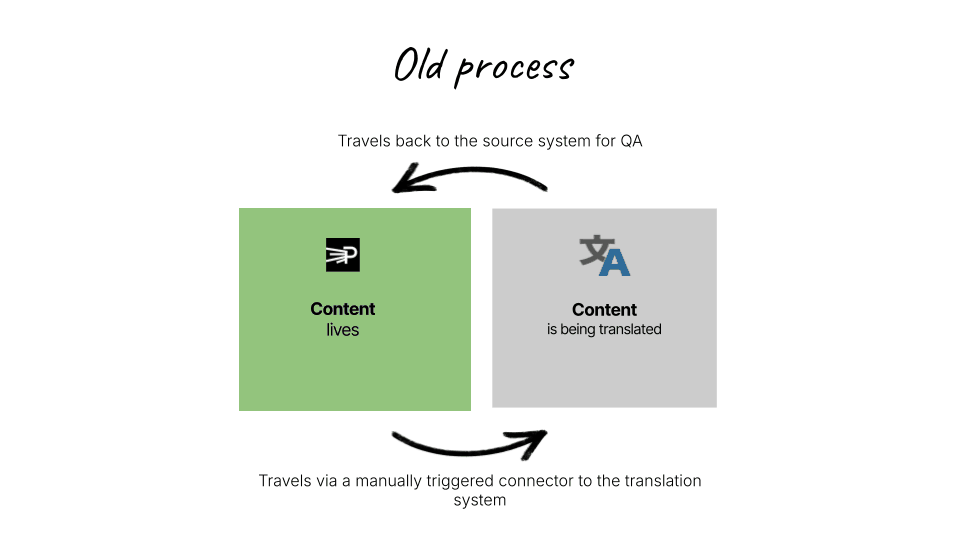
The old process moved content between two disconnected systems.
“Two boxes, two errors,” says Lia Friesem, Localization Project Manager. “Every error is a person exporting, copying, clicking. And here is the real problem: the box on the right cannot see the box on the left.”
Linguists saw each lesson as a grid of tagged text segments. They couldn’t easily tell whether a line was a headline, a button, or part of an interaction.
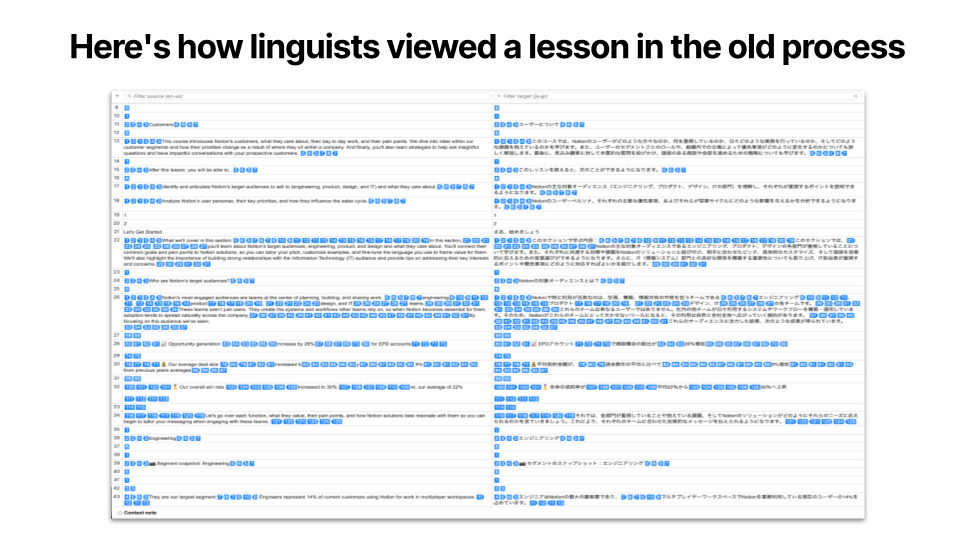
In the old tool, linguists saw each lesson as a grid of tagged segments.
Every round trip was another place for things to break. On the morning of the webinar, Lia got an error because the English source had changed mid-translation. The only fix was to resend the content, reassign the linguist, wait again, and retry the export.
The solution: translate in Parta, not around it
“The fix here, once we heard about the MCP, was not a better pipeline — it was deleting the pipeline,” says Lia. “The content stayed. And everybody comes to the content, whether it’s the translator, the editor, or the AI, in its natural habitat.”
Translation now happens directly in Parta. Human and AI translators see each lesson as learners will: title, layout, images, buttons, and surrounding content. Nothing gets exported or pasted back.
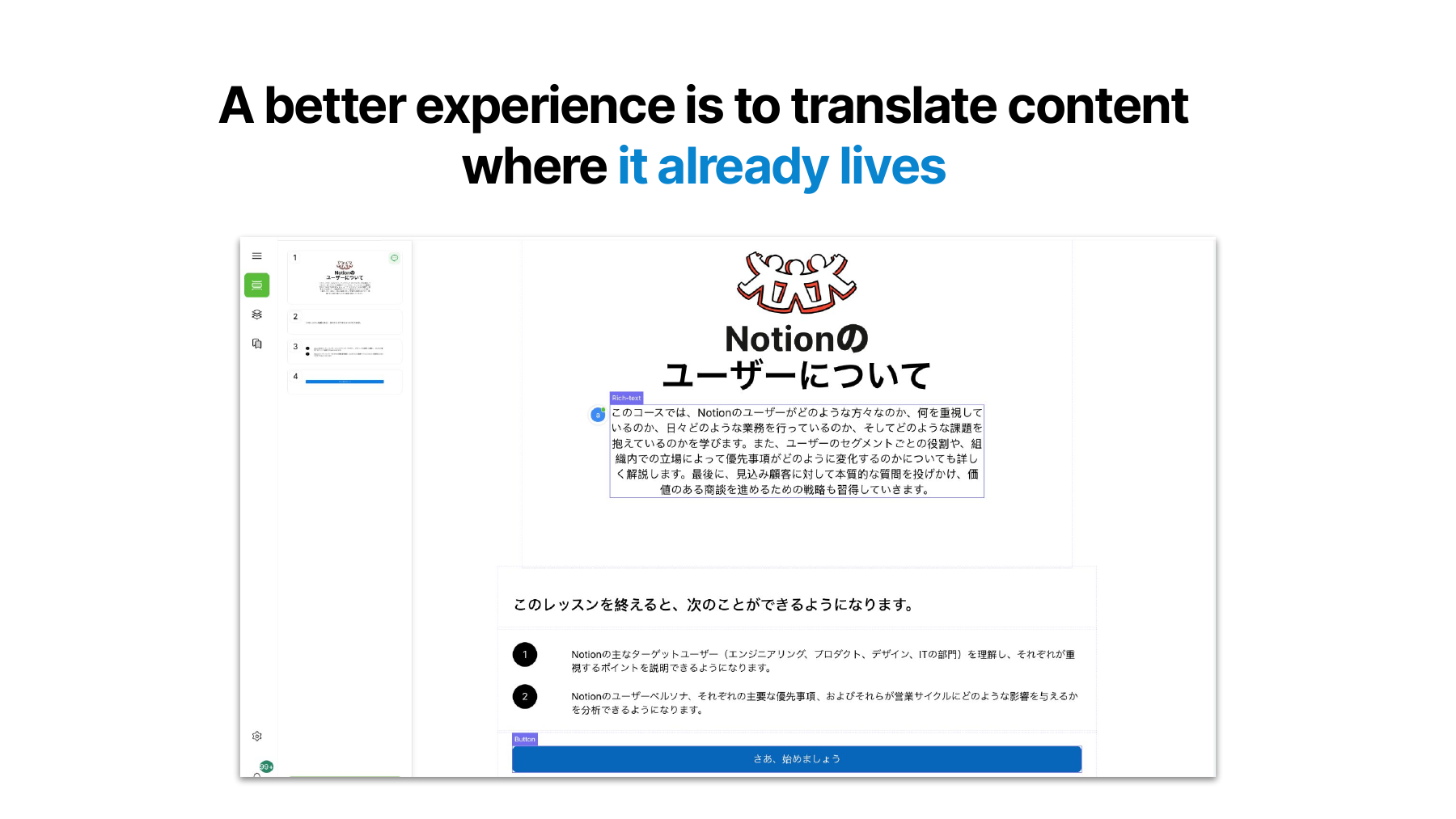
The same lesson translated in place in Parta, with layout, images, and controls visible.
Context changes word choices. In Japanese, the English word “role” can be translated more than one way. Notion’s glossary suggested ロール (rōru), a loanword often used for “role.” But in this lesson, the word meant a person’s function or responsibility. Because the editor could see the whole lesson, not an isolated string, they chose 役割 (yakuwari), the more natural word for that meaning.
The five-stage localization workflow
- Draft from Notion’s own material. The agent draws on notion.com, academy.notion.com, per-language style guides, glossaries, a do-not-translate list, and translation memory. Teams without formal language assets can start with their own website.
- Run a blind check. The model that writes never grades its own work. Notion translates with Claude and has ChatGPT review the result without the English source, an AI label, or any hint of how it was produced.
- Let a human decide. An editor reviews the draft and the reasoning behind each choice. Nothing moves forward without human judgment.
- Re-check the edited course. A second QA pass looks for typos, inconsistencies, and human errors across all lessons. Each flag comes with a priority, the exact Parta block, the current text, and the proposed change. The editor clicks straight to the block and accepts the change or declines it with a reason.
- Learn from corrections. Confirmed fixes go into translation memory. Matters of taste are logged but deliberately left out, so the next editor doesn’t inherit someone else’s style.
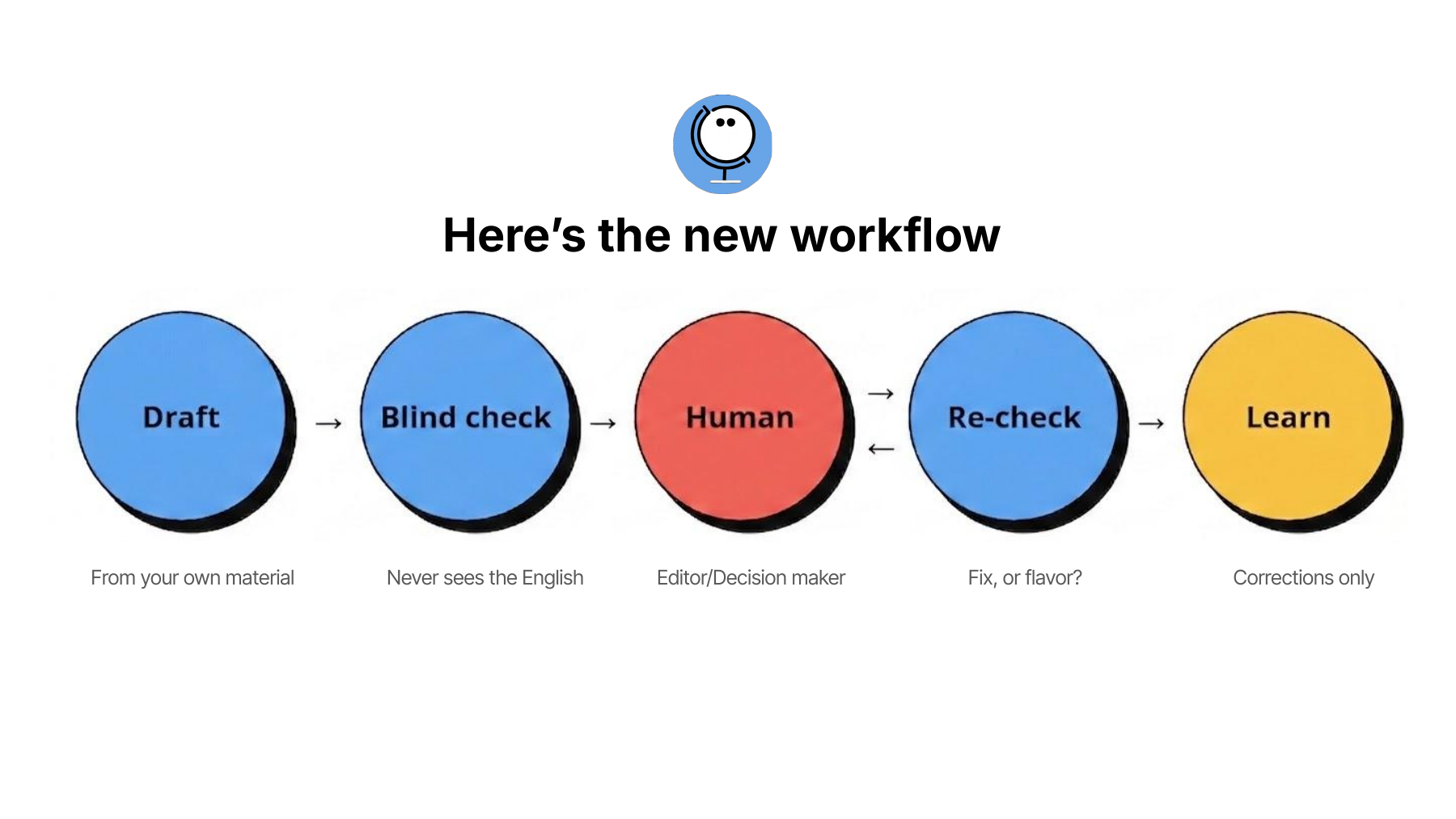
Draft, blind check, human decision, re-check, and learn: automation surrounds the editor rather than replacing them.
The QA report also measures how much was edited and whether each edit was a fix or a preference.
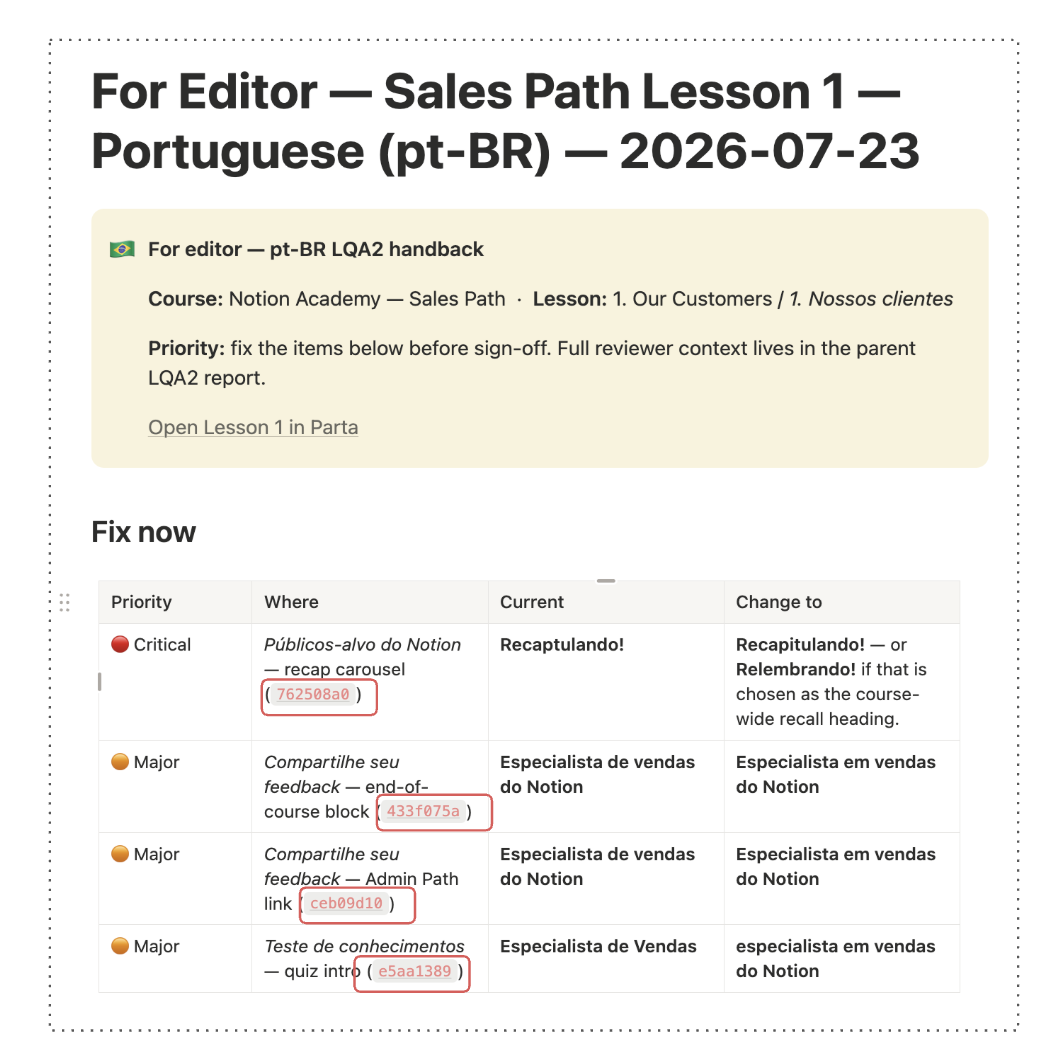
Per-lesson QA report for the Brazilian Portuguese version. Each flag links to the exact Parta block.
The results
“Our early data points to a roughly 44% saving in money, and about 2-3 weeks faster per course. This is early data — ask me again in two quarters,” says Lia.
The 44% saving already includes the cost of the agent’s translations and reports, and a human editor is still part of every course.
QA also moves earlier. Under the old process, it started only after translated content came back into Parta. Now it starts with the first draft, so a problem in the English source is fixed once, before it spreads to every language.
Lessons for Other Customer Education Teams
Notion’s setup suggests a pattern any team can borrow:
- Give each agent one job. One agent finds what changed; another drafts the fix.
- Feed agents one source of truth. A central launch database lets agents act without chasing product managers.
- Put people where mistakes are hardest to undo. Notion uses two checkpoints: scope and final copy.
- Don’t let a model grade its own work. Use a second model for a blind review.
- Keep fixes, not preferences. Only confirmed corrections go back into translation memory.
- Start small. Connect one workflow, then add structure as you learn.
“All of us started small and then grew. This only took us originally 15–20 minutes to set up the first connection… If anyone’s feeling a little overwhelmed, you can start with something very small and then build from there,” says Veronica Stimson, Partner Enablement Lead at Notion.
Frequently Asked Questions
How does Notion keep Notion Academy up to date?
Notion uses two Custom Agents connected to Parta through Parta MCP. Academy Drift Agent reads each launch document and flags affected lessons; Academy Drafting Agent drafts and stages the approved updates in Parta. People approve the scope and the final copy before anything is published.
What is content drift?
Content drift is the gap between a product that keeps changing and the learning content that explains it. It grows with every release that isn’t reflected in courses, help articles, or certifications.
What is Parta MCP?
Parta MCP is a Model Context Protocol server that lets AI agents read, create, and update courses built in Parta. It works with existing templates and blocks, so agent edits keep a course’s design and interactivity.
How much did AI localization save Notion?
Notion’s early data shows about 44% lower cost and 2–3 weeks saved per localized course, compared with its previous export-and-import process. The saving includes the agent’s costs, and a human editor still reviews every course.
Does AI replace human translators or learning designers?
Not in Notion’s setup. Agents handle drafting, detection, and QA checks; people decide what changes, edit for accuracy, and approve what gets published.
How long does it take to set up?
Notion connected its first agent to Parta in 15–20 minutes, then added structure over time. Teams without style guides or glossaries can start with their own website as source material.
______________________________________________________
Watch the full webinar. The full session includes the content-maintenance and localization demos, plus the live Q&A.
Further reading: How Notion built a Custom Agent workflow to keep Academy content current, Arya Sajjala’s own account on the Notion blog.
Ready to connect your own agents to Parta?
Explore Parta MCP and talk to our team about your use case.